Showing posts with label IPHONE TRICKS. Show all posts

Monday, July 4, 2011

Message in Any Indian Language Easily

Panini Keypad is a new technology that offers people to type in all languages of India on the mobile phone extremely fast, comfortably and easily without the need of printed characters on the keypad. And nor is the
user expected to write in English characters (Roman). The Panini Keypad allows you to write natively in any Indian script without any familiarity with English characters and is therefore ideal for the vast majority of India.
It uses artificial intelligence to accurately estimate the characters that the user could be typing and places them to his fingertips.

Currently, this technology has been developed in the form of java software that can be downloaded to your phone from this website. You would experience easy typing in Hindi or in any other Indian language and would be able to send text messages, store address book and access 3G content etc.
Current languages supported on web are Hindi, Marathi, Bengali, Telugu, Tamil, Kannada, Malayalam, Gujarati, Punjabi.

Sunday, July 3, 2011

How to Hide Pictures in iPhone

How to Hide Pictures in iPhoneYou may not be hide your pictures in your iPhone but we have a simple way for hiding them. This can increase your privacy as if anyone can
check your images but with this trick your images will be safe from the strangers eyes.
For this you need a computer if you do not have any file manager installed on your iPhone.

Follow the below steps to hide your images in iPhone .:

1. Just connect your iPhone to your computer.

2. Now open your Apple iPhone from the My computer ( Do not open it in iTunes )

3. Now you will see the DCIM folder in it in which all your pictures will be there.

4. Just cut the image which you wanna hide and simply paste it outside the DCIM folder, you can create a new folder if you want to manage your pictures.

5. Now your images will be hidden from your iPhone photos folder, but these are accessible from your computer.

6. These same steps can be done through a File Manager which you can install from Cydia by searching iFile.

That’s it now you have a proper guide on hiding your images from the strangers eyes, try it out and have fun hiding some of them. If you liked this post you can like it below to share it and +1 this too.

Saturday, June 25, 2011

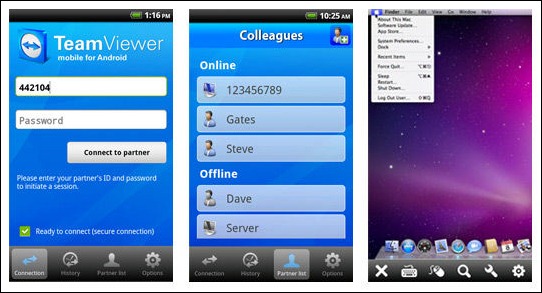
Team Viewer App For Android Released

Team Viewer is a very popular desktop client enabling you to use another's desktop right from your own computer. Its basically used by professional to repair any kind of problems
on ones computer. Android has released a stable version for Team Viewer App available in the Android Market to be downloaded by you.
Team Viewer App For Android Released
Features for the Team Viewer Free Version .:
1. For quickly assisting your friends and family members.
2. Basically used for accessing your private computer.
3. Used for rebooting your remote computer.
(Source: TeamViewer)

Thursday, June 23, 2011

10 Exclusive Tricks For iPhone

Below are some of the best and exclusive tips right for your iPhone just have have a look @ all of them may you get some best usability from them.

1. Enabling parental Control .: parental control is really useful when you want to apply restrictions to your child on what he is accessing from his iPhone. You can restrict Music, Photos, Videos etc.
Go to Settings > General > Restrictions.
Simply enable it and enter the 4 digit passcode you are done now just restrict apps you want to.
2. Email Multiple Images .: you can email multiple images by going to.
Photos > Select the album you want to use > Tap icon on the bottom left > Select up to 5 Photos > now you can simply share, copy or delete.
3. Scroll to Top .: running any application or browsing contacts if you want to directly go on top than there is simply touch to go up option. When you are down in some app simply touch the above status bar and it will slide you back to top.
4. Adding words to dictionary .: some words may not be recognized by your iPhones as they can be from your native language but if you are typing something in notepad and you typed it something for 5 times than that word is automatically added into your dictionary.
5. Quick Delete Trick .: you can a great deleting feature in iPhone by simply touching and selecting all the stuff you wanna delete and than simply deleting than up but if you wanna quickly delete than there is simply quick trick just swipe that word or email or anything a notepad file it will give you a option to delete that single file easily.
6. More special Characters .: if uou want to add some stylish letter than simply hold that letter like A or B than you will see many more letters from that word will just Pop Up in front of you.
7. Street View for From Google .: Search for a city like New York or anything > Afterwards you will see a little orange badge > Tap on that badge to get Google Street View. That’s it now Impress your friends.
8. Soft Reset .: Press and hold Power and the Home Button together for few seconds than your iPhone will reboot.
9. Battery Saving Tips .: iPhone sucks @ the battery point of view so check some Tips below to save some amount for the future use.
  • Go to Settings > Brightness > Dim your screen to 50 % approx.
  • Go to Settings > Mail,Contacts,Calendar > Fetch New Data > Make it manually.
  • Turn off 3G by going to Settings > Network > Enable 3G and Slide it to Off.
  • Bluetooth should also be switched off @ the time you don’t need it General > Bluetooth > Slide it too Off.
10. Mute Ringer .: when a call comes both ringer and vibration goes on just press the Sleep button ones to silent it and press one more time to make it busy.
So that were some of the Tricks to get your iPhone experience into a smooth road and help you have more fun Smile